Memory, knowledge and notes
Saelyx remembers what you tell it and what you give it, and shares it across your devices with the same session. Everything it keeps you can see, edit and delete.
Note
The Mac app and the web account are still partly in Spanish. This guide names settings in English; if you see the Spanish original, it's the same setting.
Where everything is
| What | Mac | iPhone | Web (Account) |
|---|---|---|---|
| Memory | Memory | More → Memory | Memory |
| Knowledge base | Knowledge | Menu → Knowledge base | Knowledge |
| Files | Files | More → Files | Files |
| Notes | Notes | More → Notes | Notes |
| Reminders | Reminders | More → Reminders | Reminders |
| Skills | Settings → Skills |
Menu → Skills | Skills |
| Dictionary | — | — | Dictionary |
Memory
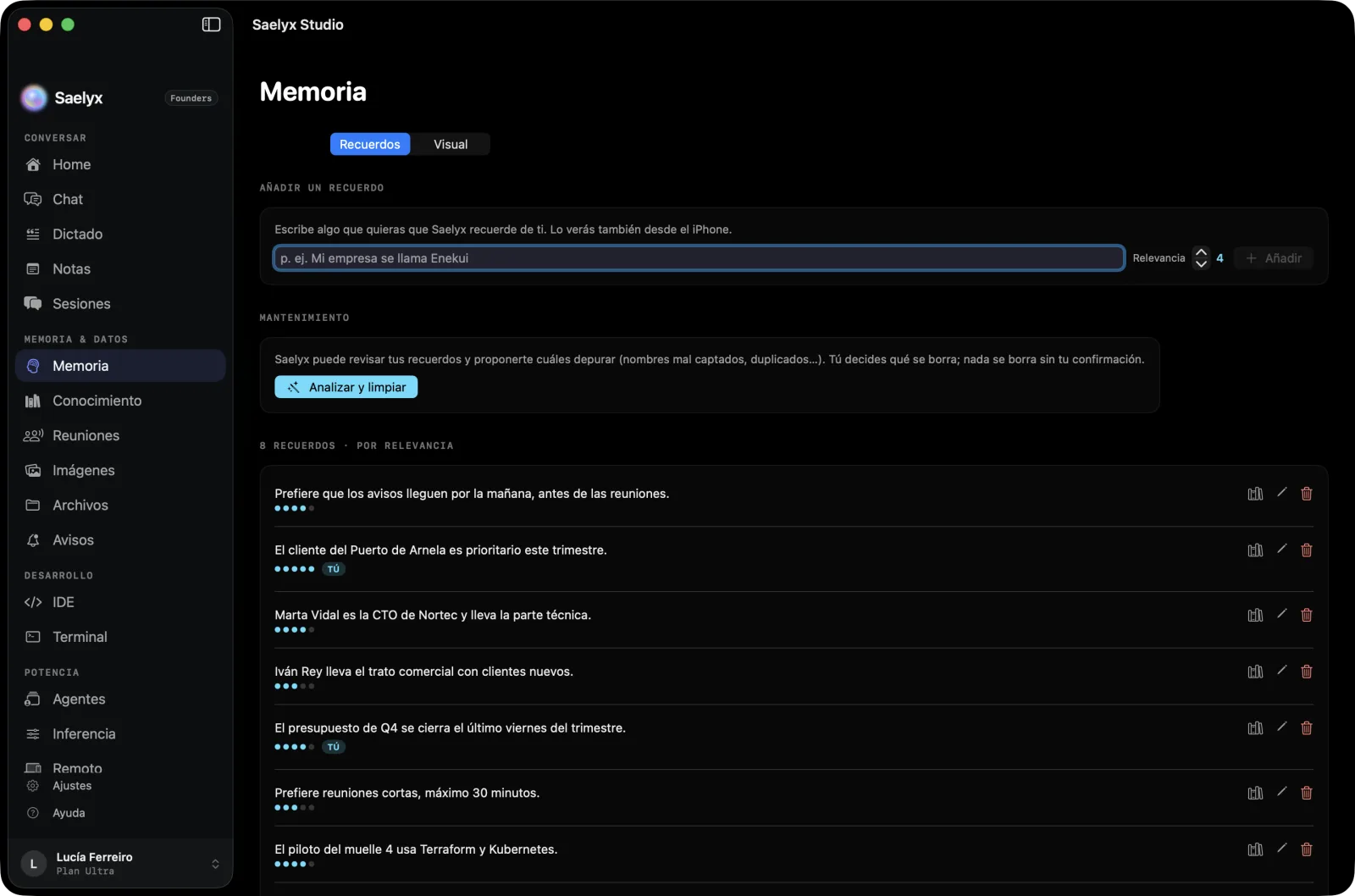
Memory is the lasting facts Saelyx picks up from your conversations: your preferences, the people around you, your routines. You see them as a list of plain sentences.
- Edit or delete one. From the list.
- Add a memory. In the Mac's memory, type whatever you want it to remember. It shows up on the iPhone too.
- Clean up. Under Maintenance, Analyse and clean up has Saelyx review your memories and suggest which to prune (misheard names, duplicates, unconfirmed memories). You approve each one; nothing is deleted without your confirmation. You can run one analysis a day.
- Delete all memory. The Delete all memory button makes Saelyx forget everything it has learnt about you. It can't be undone. You can also ask it by voice to forget everything it knows about you.
If you turn on face recognition, the gallery of faces and scenes appears under Images. It's optional, and turning it off deletes the saved faces (see Privacy and your data).
Your personal profile
Over time, Saelyx distils your loose memories into a profile titled "Who I am", with fixed sections: identity, people, preferences, life context and lasting facts. It's loaded at the start of every session so Saelyx answers the way it knows you. You can see it on the web, under Account → Knowledge.
- Edit it by hand, empty it or tap Regenerate to have it distilled again from your memories.
- History: it keeps up to 10 versions and you can go back to an earlier one.
- If you empty it yourself, Saelyx won't rebuild it on its own until you tap Regenerate or write it by hand.
Knowledge base and files
Upload PDFs, notes or whole folders and Saelyx answers from them, citing where each fact comes from. Uploading takes two phases: it analyses what you upload, shows a preview and waits for your confirmation.
- Types:
.txt,.md,.csv,.json,.log,.rst,.organd office files (PDF, Word, Excel, PowerPoint). - Limits: on Free you can add up to 10 files a day and hold 50 in total; on Pro, 8,000 a day and 20,000 in total.
Under Files you see in one list what you upload and what Saelyx generates for you, with preview and delete. Attaching files to a conversation is free; asking Saelyx to generate a document (PDF, Word, Excel, PowerPoint or text) is Pro.
Share with Saelyx (Mac)
On the Mac, Saelyx appears in the system Share menu. Pick a file, an image, a link or some text in any app, tap Share and choose Saelyx: it opens and treats it as if you had attached it with the +. It accepts up to 10 files, up to 10 images, 1 link or some text, with a maximum of 25 MB per item. If you're in a meeting with Record only, what you share waits and is processed when the meeting ends.
Notes
Notes are the same on the Mac, iPhone and web, with tags and search. You can dictate a new note ("make a note that…") or ask it to add something to an existing one, and ask it to read or find one.
You can also ask about what you talked about: "what did we talk about on Tuesday?" searches by topic or date.
Dictionary
On the web, Account → Dictionary, add proper names, acronyms or jargon with what they mean, so Saelyx understands them. It holds up to 500 terms.
Reminders
Tell it when and what, in your own words: "tomorrow at 9", "every Monday at 8". Saelyx alerts you with a notification, with an email backup. You can create them from the watch. They're managed under Reminders. This is a Pro feature.
Skills
Saelyx learns, in the background, procedures and preferences that repeat in your conversations. Under Skills you see each one with its trigger, and can delete them one by one or all together ("Delete all skills"). This can't be undone.
Reviewed on 29 Oct 2026 · Saelyx for Mac 0.10.196 · iPhone 1.1.40